Print Security is in style in 2021. Big Time.
Consider this: According to Industry Analysts Inc., 78% of organizations intend to increase print security spending following a dramatic drop in IT confidence in enterprise print infrastructure security. Overall, the report highlights a dramatic drop in the level of confidence in print device and associated print infrastructure security, which is justified given that 64% of organizations reported they had experienced print related data losses in 2020.
It’s a haute topic — and one that we should be having with our customers, whether they’re considering current vulnerabilities, or unaware of their MFP being another device on their network (as vulnerable to attack as a desktop computer).
MFP Security Style Points: 5 Conversations to Have With Customers.
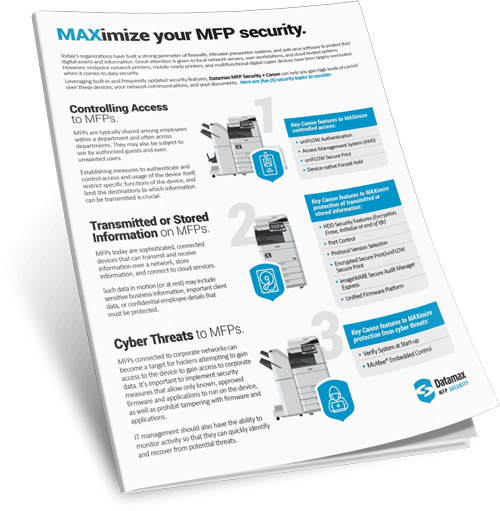
1. Controlling Access to MFPs.
MFPs are typically shared among employees within a department and often across departments. They may also be subject to use by authorized guests and even unwanted users. Establishing measures to authenticate and control access and usage of the device itself, restrict specific functions of the device, and limit the destinations to which information can be transmitted is crucial.
2. Transmitted or Stored Information on MFPs.
MFPs today are sophisticated, connected devices that can transmit and receive information over a network, store information, and connect to cloud services. Such data in motion (or at rest) may include sensitive business information, important client data, or confidential employee details that must be protected.
3. Cyber Threats to MFPs.
MFPs connected to corporate networks can become a target for hackers attempting to gain access to the device to gain access to corporate data. It’s important to implement security measures that allow only known, approved firmware and applications to run on the device, as well as prohibit tampering with firmware and applications. IT management should also have the ability to monitor activity so that they can quickly identify and recover from potential threats.
4. Security Settings and Device Activity on MFPs.
IT support teams are typically responsible for managing a fleet of MFP devices. This becomes a burden if there aren’t proper tools available to ensure that security settings are easily established and deployed universally across the fleet. Requirements for passwords, such as expiration period, lockout time, and complexity should also be put in place.
5. Regulation, Compliance and MFPs.
In today’s digital, cyber threat-ridden world, government regulations compel businesses to satisfy compliance or risk facing penalties. The MFP, where sensitive data exists, should be part of your compliance strategy. Responding to regulatory compliance requirements can be complex. And since an organization’s sensitive information is interacting with MFPs, they become a necessary component of compliance initiatives.