Perhaps the most common blind spot occurs inside a vehicle, particularly that large, gas-guzzling SUV.
A blind spot is an area around the vehicle that obscures your vision. It’s a spot that your mirrors and cameras don’t cover. The length, height, and design of a vehicle often determine where the blind spots are located. So how do you combat this?
You turn your head around and take a closer look.
Businesses today face a similar obstacle. Technical blind spots present major information security challenges for business owners or IT directors, as they try to uncover hidden risks and vulnerabilities. From weak passwords, to unpatched systems to poor end-user awareness, all present holes (or blind spots) in our mission to keep critical information secure.
We asked VP of Strategic Technology Justin Huffaker about these blind spots that exist for businesses today, and he delivered some big-picture insight. So let’s turn our heads and get a closer look.
Justin's 3 Big Blind Spots in Cybersecurity Today.
1. Taking it seriously.
Many people in the cybersecurity space think of attacks as not a matter of "if" but "when." Justin likens cybersecurity awareness to an insurance policy. To put it another way, many people think “a hurricane or fire or tornado will NEVER hit me.” And then it does.
“Every time there’s a disaster 100s of thousands of people are caught off guard. Despite the warnings, people continue to think it will never happen to them. That same mindset applies to the tumultuous cybersecurity climate today."
2. Information theft.
In Datamax’s security awareness training for IT clients, there is a segment specifically about MFPs. It’s imperative that employees think harder about the information they share, even via printing, as a potential risk and should be guarded accordingly.
People often think that if they print documents, then that’s the end of it. It’s a common sight for people to print information, forget they printed it, and then it sits on the device for people to take.
"If you’re in the office after 5 p.m. watch the cleaning crew pick up trash cans, and you’ll be surprised how many pieces of paper are thrown away that are not shredded. Once those un-shredded bags of documents hit the dumpster outside, it's like mining for gold (for cybercriminals). Those un-shredded documents could contain HR information, intellectual property, financial data, etc."
3. Employee Training.
This is a huge one.
“The biggest vector for attacks is through employees, via Ransomware, spoofing, trickery. Employees HAVE to be trained and it is often overlooked by IT people and executives all the time because they imagine it’s like the movie The Matrix: with the code rolling down the screen, people in a hoodie in a dark room with 47 monitors trying to hack into your system.”
Does that happen? Yes, he says. But the vast minority of security breaches are due to your employees being fooled and making simple, preventable mistakes.
Justin's 4 Essential Traits for Cybersecurity Training:
- Communication: It starts here. Whether it’s through internal IT staff, or an outsourced training partner, communicate the urgency of cyber security awareness to anyone who touches a computer at your office. Share password best practices. Break down the anatomy of an email so your end users know what they should be looking for. Cut out the buzzwords and provide real, practical advice.
- Cognizance: Protecting yourself from cyber criminals calls for constant awareness and suspicion of every email (or phone call or text) that comes across an end user’s desk. It also includes not allowing documents to sit on top of copier trays, eventually thrown away without being shredded. Such documents can provide valuable information for potential cyber criminals.
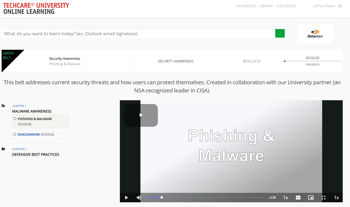
- Consistency: A one-time training event or webinar won’t do the trick. Continue to reinforce the necessity of recognizing social engineered attacks effectively. Programs like TechCare University offer employee cyber security training that includes password best practices, education on social engineering, and even simulated phishing email "attacks" that test employees.
- Common sense: This goes a long way in detecting phishing attacks or social engineering ... a perfect example being the email from your “boss” requesting iTunes gift cards. In short, if it sounds "off," or too good to be true, it probably is. Practice multi-factor authentication with communication: Follow up via phone, or walk down the hallway, and check with the individual to substantiate the email request.
Ready to take your training in your own Hands??? Click below to get started with TechCare University and cybersecurity training!
-
What is TechCare University? Learn more here.
-
Have trouble getting logged in? Reach out to Tamara Hargrove or Faith Oliver to set up YOUR account!